
How to Translate Raw Manga: Read Unreleased Japanese Chapters First
Learn how to read and translate raw Japanese manga chapters the same day they release. Solve vertical text, furigana filtering, and screentone preservation.
For passionate manga fans, waiting weeks or months for official translations or scanlation releases is agonizing. Every week, new chapters of One Piece, Jujutsu Kaisen, and Chainsaw Man drop in Japan days before localized versions surface online.
These untranslated Japanese originals are called "Raw Manga" (生肉 / Nama-niku). Reading them firsthand used to require years of Japanese study. Today, specialized comic AI tools let anyone read raw manga chapters on release day. Here is everything you need to know.
What Makes Raw Manga Challenging to Translate?
General-purpose translation apps like Google Translate fail miserably when pointed at raw manga. Japanese comic pages introduce four distinct engineering hurdles:
- Vertical Text (Tategaki). Standard OCR reads horizontally and jumbles sentences.
- Furigana Ruby Text. Kanji radicals get duplicated with pronunciation kana.
- Screentone Shading. Erasing text leaves unnatural white rectangles.
- Right-to-Left Narrative. Multi-column speech balloons require context inversion.
1. Vertical Right-to-Left (Tategaki) Reading Flow
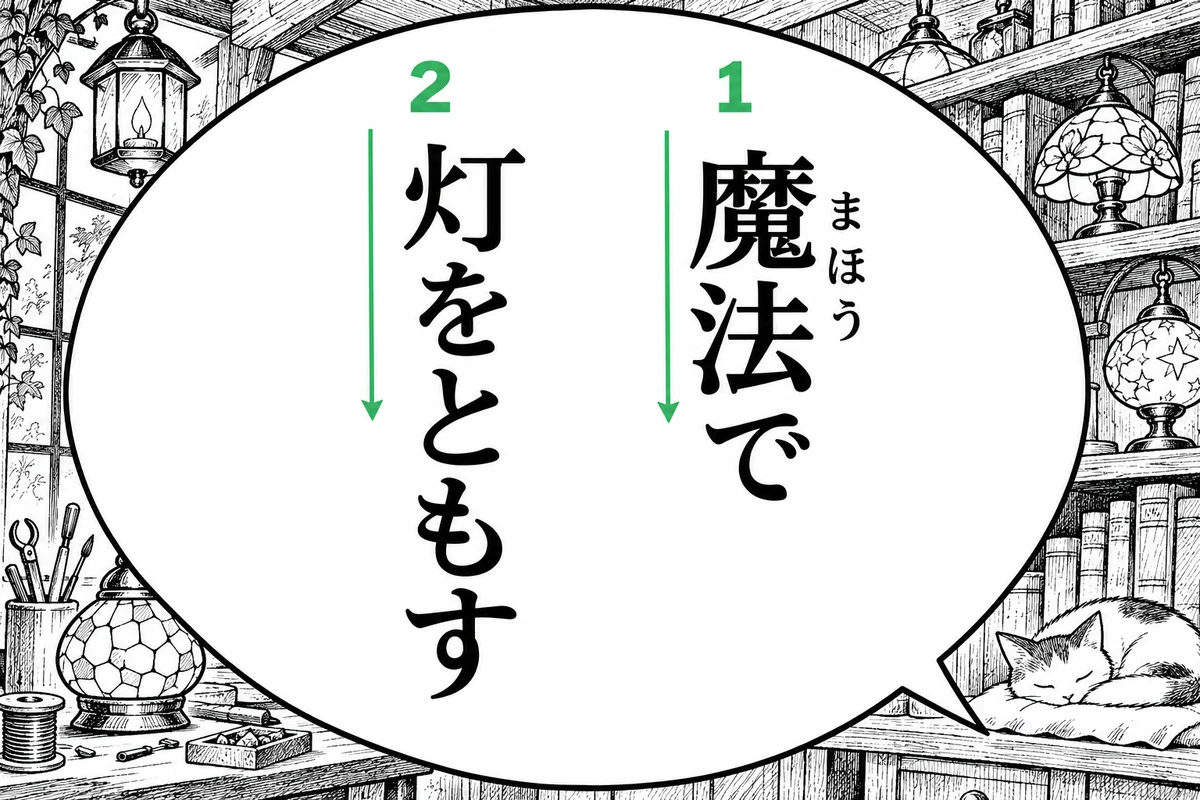
Japanese manga dialogue is oriented vertically, read from top to bottom, and ordered from right to left across columns within a speech balloon. Generic document scanners assume horizontal left-to-right text, mixing lines together into nonsensical word salads.
2. Furigana (Ruby Annotation) Interference
Shonen and shojo manga aimed at younger demographics include tiny phonetic hiragana (furigana) next to kanji characters. Ordinary OCR systems cannot distinguish between the main kanji and its side pronunciation, outputting duplicated phrases like 魔法まほう instead of recognizing the single word 魔法 (Magic).
3. Screentone Preservation (No White Out Boxes!)
Japanese mangaka draw on textured screentone sheets (fine patterns of tiny black dots). When text is placed directly over screen patterns, crude translation tools simply slap white boxes over the text. This erases the author's intricate lighting, character hair, and backgrounds.
Where to Find High-Quality Raw Manga Legally
The cleanest translation results come from pristine digital source images. Here are top Japanese platforms where raw chapters are officially published:
| Platform | Best For | Raw Quality | Notes |
|---|---|---|---|
| Shonen Jump+ (少年ジャンプ+) | Chainsaw Man, Spy x Family, Kaiju No. 8 | Pristine Digital HD | Official Shueisha digital reader |
| Comic Days (コミックDAYS) | Kodansha titles (Vinland Saga, Blue Lock) | Ultra High-Res Web | Many chapters free for limited time |
| BookWalker Japan | Full digital volumes & light novels | DRM-protected retail | Best volume collection in Japan |
| Comic Walker (KADOKAWA) | Isekai & fantasy adaptations | Official Web Reader | Free weekly serializations |
| Pixiv Comic / Nico Nico Seiga | Indie, doujinshi, and emerging authors | Varied (Web PNG) | Great for niche webcomics |
Step-by-Step: Translating Raw Manga with AI
Follow this straightforward workflow to translate raw chapters in minutes:
Step 1: Prepare Your Raw Pages
Save your target raw pages as high-resolution images (JPG, PNG, or WebP). If capturing from web readers, take full-screen browser screenshots or use clean image exports.
Step 2: Upload to AI Manga Translator
Navigate to AI Manga Translator and drag your raw pages into the upload panel. You can upload an entire chapter at once.
Step 3: Select Japanese -> Your Language
Set the source language to Japanese (日本語) and choose your preferred destination language (English, Spanish, Chinese, French, etc.). The AI automatically enables:
- Vertical Tategaki Parsing: Correct reading order from top-right to bottom-left.
- Furigana Separation Engine: Filters out ruby kana annotations to maintain pure semantic meaning.
- Neural Inpainting: Synthesizes halftone dots under the erased Japanese text to preserve artwork integrity.
Step 4: Read and Compare Instantly
Once processed (under 10 seconds per page), open the built-in reader. You can toggle between the Japanese raw and the translated page with a single keypress, or slide the interactive lens to inspect fine details.
Summary Checklist for Raw Manga Enthusiasts
- Always prioritize digital web raws over low-quality camera photos of magazine paper.
- Verify vertical bubble parsing on dense exposition panels.
- Use the side-by-side view if you are learning Japanese—it turns every raw chapter into a personalized language study tool!
References & Authoritative Sources
- Agency for Cultural Affairs of Japan — Media Arts Database (MADB) Comic Archival Standards
- Japan Electronic Publishing Association (JEPA) — Fixed-Layout EPUB Specifications for Digital Manga
- International Color Consortium (ICC) — Specification ICC.1: Color Profiles and Screentone Calibration